Posted in Linux 11 years ago 3 min read

Laptop cepat panas meskipun sedang idle atau tidak digunakan adalah salah satu problem yang seringkali dialami oleh pengguna Linux. Salah satu penyebab yang mungkin adalah adanya firmware yang tidak sesuai dengan fan/kipas laptop.
Selain itu, mungkin saja memang kipasnya yang sudah rusak, tapi kalau sudah dipastikan kipas tidak rusak berarti firmware harus Anda cek.
 FWTS tes Fan[/caption]
Perintah itu bertujuan untuk mengetes apakah kipas terpasang atau tidak, kemudian sekaligus membuat CPU bekerja untuk melihat perubahan dari kipas terhadap CPU yang sedang bekerja. Ini dapat Anda lihat pada System Monitor, saat melakukan pengetesan CPU Usage akan naik drastis.
Berikut ini adalah output dari perintah tersebut:
FWTS tes Fan[/caption]
Perintah itu bertujuan untuk mengetes apakah kipas terpasang atau tidak, kemudian sekaligus membuat CPU bekerja untuk melihat perubahan dari kipas terhadap CPU yang sedang bekerja. Ini dapat Anda lihat pada System Monitor, saat melakukan pengetesan CPU Usage akan naik drastis.
Berikut ini adalah output dari perintah tersebut:
Laptop Cepat Panas di Ubuntu? Coba Cek Firmware Terlebih Dahulu
Untuk mengecek kecocokan firmware yang terinstall di laptop atau komputer kita tidaklah sulit. Ada sebuah software/tool berbasis terminal yang dapat digunakan untuk mengecek firmware. Tool itu bernama FWTS. FWTS merupakan singkatan dari Firmware Test Suite (fwts). Sesuai dengan namanya, tool ini berfungsi untuk melakukan testing dari berbagai aspek dari firmware yang ada di komputer kita. Tes yang dapat dilakukan jumlahnya lebih dari 50 tes. Untuk menggunakan FWTS ini, disarankan agar kita menggunakan sudo atau menjadi super user. Hal ini karena beberapa tes membutuhkan pembacaan data dari BIOS dan ACPI tables. Di dalam FWTS ini ada 6 pengelompokan tes, yaitu:- Batch
- Batch Experimental
- Interactive
- Interactive Experimental
- Power Management, dan
- Utilities
Menggunakan FWTS
Nah, terkait tool FWTS di atas, saya sendiri juga mencobanya untuk mengetes apakah ada permasalahan dari firmware di laptop saya atau tidak. Hal ini karena saya merasa bahwa laptop saya lebih terasa panas ketimbang saat menggunakan Windows. Awalnya saya mengetes secara keseluruhan dengan command sudo fwts, tapi ternyata ada banyak sekali hasil yang keluar. Dan memang ada beberapa firmware yang tidak lolos tes. Yah, berhubung saya ga begitu paha juga jadi saya biarkan. Setelah itu, saya coba mengetes fan/kipas dengan perintah sudo fwts fan - [caption id="attachment_5281" align="aligncenter" width="300"]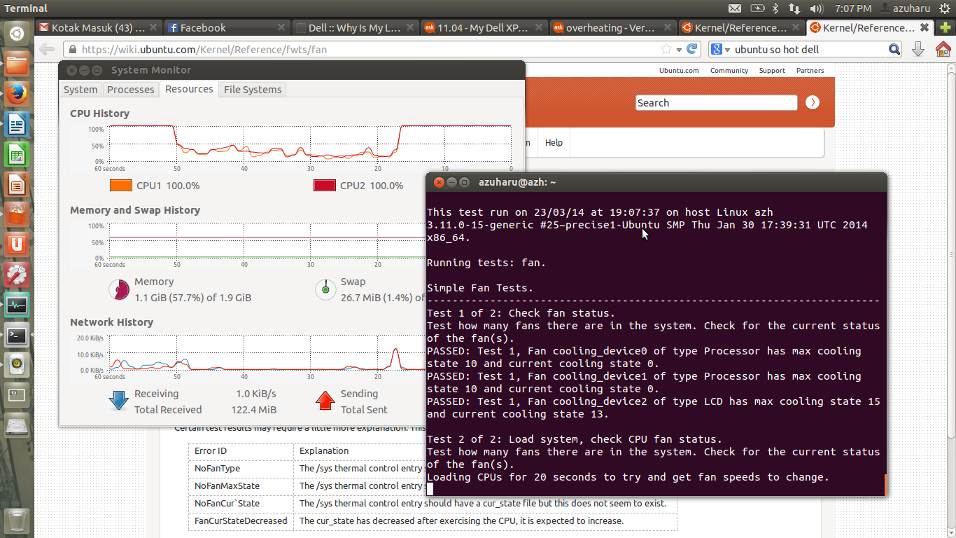 FWTS tes Fan[/caption]
Perintah itu bertujuan untuk mengetes apakah kipas terpasang atau tidak, kemudian sekaligus membuat CPU bekerja untuk melihat perubahan dari kipas terhadap CPU yang sedang bekerja. Ini dapat Anda lihat pada System Monitor, saat melakukan pengetesan CPU Usage akan naik drastis.
Berikut ini adalah output dari perintah tersebut:
FWTS tes Fan[/caption]
Perintah itu bertujuan untuk mengetes apakah kipas terpasang atau tidak, kemudian sekaligus membuat CPU bekerja untuk melihat perubahan dari kipas terhadap CPU yang sedang bekerja. Ini dapat Anda lihat pada System Monitor, saat melakukan pengetesan CPU Usage akan naik drastis.
Berikut ini adalah output dari perintah tersebut:
Results generated by fwts: Version V0.25.06precise1 (Tue Sep 4 12:56:28 CST 2012). Some of this work - Copyright (c) 1999 - 2010, Intel Corp. All rights reserved. Some of this work - Copyright (c) 2010 - 2012, Canonical. This test run on 23/03/14 at 19:07:37 on host Linux azh 3.11.0-15-generic #25~precise1-Ubuntu SMP Thu Jan 30 17:39:31 UTC 2014 x86_64. Running tests: fan. Simple Fan Tests. ------------------------------------------------------------------------ Test 1 of 2: Check fan status. Test how many fans there are in the system. Check for the current status of the fan(s). PASSED: Test 1, Fan cooling_device0 of type Processor has max cooling state 10 and current cooling state 0. PASSED: Test 1, Fan cooling_device1 of type Processor has max cooling state 10 and current cooling state 0. PASSED: Test 1, Fan cooling_device2 of type LCD has max cooling state 15 and current cooling state 13. Test 2 of 2: Load system, check CPU fan status. Test how many fans there are in the system. Check for the current status of the fan(s). Loading CPUs for 20 seconds to try and get fan speeds to change. Fan cooling_device0 current state did not change from value 0 while CPUs were busy. Fan cooling_device1 current state did not change from value 0 while CPUs were busy. ADVICE: Did not detect any change in the CPU related thermal cooling device states. It could be that the devices are returning static information back to the driver and/or the fan speed is automatically being controlled by firmware using System Management Mode in which case the kernel interfaces being examined may not work anyway. ======================================================================== 3 passed, 0 failed, 0 warnings, 0 aborted, 0 skipped, 0 info only. ======================================================================== 3 passed, 0 failed, 0 warnings, 0 aborted, 0 skipped, 0 info only. Test Failure Summary ======================================================================== Critical failures: NONE High failures: NONE Medium failures: NONE Low failures: NONE Other failures: NONE Test |Pass |Fail |Abort|Warn |Skip |Info | ---------------+-----+-----+-----+-----+-----+-----+ fan | 3| | | | | | ---------------+-----+-----+-----+-----+-----+-----+ Total: | 3| 0| 0| 0| 0| 0| ---------------+-----+-----+-----+-----+-----+-----+ azuharu@azh:~$Meskipun hasilnya tidak ada masalah dengan fan, tapi tetap saja saya masih penasaran. Oleh karena itu jika teman-teman paham tentang kenapa laptop cepat panas, mungkin bisa beritahu saya juga hehe Sekian post tentang Laptop cepat panas saat menggunakan Ubuntu, dan bagaimana mengecek firmware dengan FWTS. Semoga bermanfaat.


