Posted in PHP 12 years ago 3 min read

Sebelumnya telah dibahas mengenai GAPI sebagai salah satu project yang memudakan programmer untuk menampilkan statistik website menggunakan API Google Analytics.
Sebagai tutorial pertama, post ini membahas demo dari GAPI.
Untuk mendownload GAPI, anda dapat mengunduhnya di https://code.google.com/p/gapi-google-analytics-php-interface/
Setelah selesai mengunduh, silakan extract file tersebut di localhost anda dan ikuti pembahasan menampilkan data website menggunakan GAPI di bawah ini.
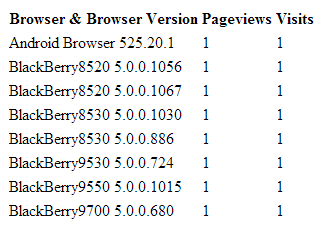 Example Report GAPI[/caption]
Jika anda mengalami error dengan pesan sejenis no valid parameter, silakan mengunjungi tulisan saya di sini.
Semoga bermanfaat
Example Report GAPI[/caption]
Jika anda mengalami error dengan pesan sejenis no valid parameter, silakan mengunjungi tulisan saya di sini.
Semoga bermanfaat
Menampilkan Data Website Menggunakan GAPI
Di dalam project yang anda unduh tadi, terdapat beberapa file seperti gapi.class.php, example.report.php, example.filter.php dan lain sebagainya. File gapi.class.php merupakan file utama yang dibutuhkan untuk menggunakan GAPI. Selain itu, file dengan nama awalan example merupakan demo yang dapat anda coba sebagai demo sederhana. Berikut ini adalah isi dari example.report.php yang harus anda coba sebagai awal latihan.<?php
define('ga_email','youremail@email.com');
define('ga_password','your password');
define('ga_profile_id','your profile id');
require 'gapi.class.php';
$ga = new gapi(ga_email,ga_password);
$ga->requestReportData(ga_profile_id,array('browser','browserVersion'),array('pageviews','visits'));
?>
<table>
<tr>
<th>Browser & Browser Version</th>
<th>Pageviews</th>
<th>Visits</th>
</tr>
<?php
foreach($ga->getResults() as $result):
?>
<tr>
<td><?php echo $result ?></td>
<td><?php echo $result->getPageviews() ?></td>
<td><?php echo $result->getVisits() ?></td>
</tr>
<?php
endforeach
?>
</table>
<table>
<tr>
<th>Total Results</th>
<td><?php echo $ga->getTotalResults() ?></td>
</tr>
<tr>
<th>Total Pageviews</th>
<td><?php echo $ga->getPageviews() ?>
</tr>
<tr>
<th>Total Visits</th>
<td><?php echo $ga->getVisits() ?></td>
</tr>
<tr>
<th>Results Updated</th>
<td><?php echo $ga->getUpdated() ?></td>
</tr>
</table>
Perhatikan code berikut dari example.report.php
define('ga_email','youremail@email.com'); //ubah sesuai dengan email anda
define('ga_password','your password'); //ubah sesuai password email anda
define('ga_profile_id','your profile id'); //ubah dengan id profile Google Analytics anda
Code di atas adalah konfigurasi yang harus anda ubah untuk dapat menampilkan data website menggunakan GAPI.
Untuk bagian your profile id adalah id dari website di Google Analytics anda, berupa beberapa digit angka seperti 51378101.
Profile id inilah yang menentukan statistik website mana yang ditampilkan oleh GAPI.
Jika anda merasa bingung anda dapat membaca post saya di Menentukan Profile Id Google Analytics.
Menjalankan Script
Setelah selesai mengubah example.report.php, anda dapat menyimpan dan mencoba menjalankannya pada browser. Hasilnya kurang lebih seperti ini (tergantung dari statistik website anda). [caption id="" align="aligncenter" width="323"] Example Report GAPI[/caption]
Jika anda mengalami error dengan pesan sejenis no valid parameter, silakan mengunjungi tulisan saya di sini.
Semoga bermanfaat


